
by The Team @ Giant Swarm on Apr 1, 2026
This post is based on a talk given at KCD UK 2025 by Joe Salisbury.
At Giant Swarm, we’ve recently finished replacing our custom-built Kubernetes cluster management system with Cluster API. The migration involved live-migrating hundreds of enterprise production clusters on AWS: without downtime, without data loss, and without rebuilding them from scratch. Here's what that looked like, what broke along the way, and what we'd tell ourselves if we could go back.
Where we started: a custom operator stack
Giant Swarm builds, operates, and manages cloud native developer platforms for enterprise customers. We deploy into customer accounts and manage the infrastructure, so platform teams can focus on higher-level concerns. At the base of that offering is a Kubernetes-as-a-Service product, and for years, it ran on a fully custom architecture.
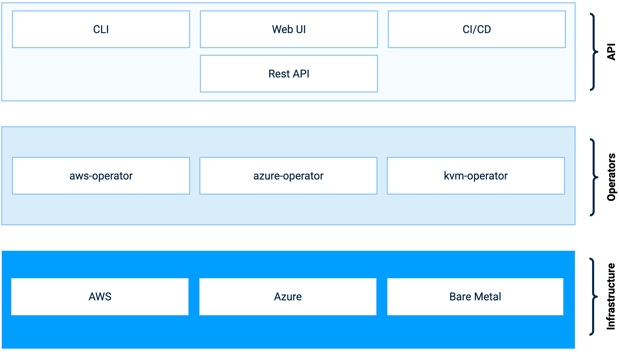
The overall architecture is fairly straightforward: a REST API layer on top, a set of provider-specific Kubernetes operators in the middle, and the actual infrastructure at the bottom. On AWS, for example, our aws-operator (first written in February 2017, back when Kubernetes still used TPRs instead of CRDs) watched a cluster Custom Resource and reconciled it into a set of CloudFormation stacks that formed the actual Kubernetes cluster. We had equivalent operators for Azure and a solution for on-prem using KVM for nested virtualization.
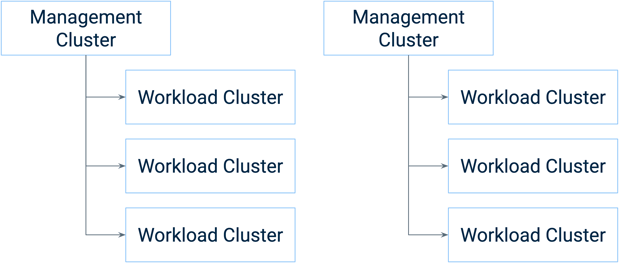
Topologically, we ran one management cluster per cloud region or data center, each managing multiple workload clusters. No shared infrastructure between management clusters also means no shared infrastructure between customers.
Why Cluster API
Cluster API also started in 2017, quickly becoming a Kubernetes sub-project. Its goal was and is the same problem we'd been solving: declarative APIs and tooling for provisioning, upgrading, and operating Kubernetes clusters.
There are notable similarities in overall design. Both systems take a custom resource as input and produce a running Kubernetes cluster as output, and use a similar cluster topology. But the architectures do differ in meaningful ways — Cluster API separates responsibilities differently between its core and infrastructure provider controllers, and uses dedicated bootstrap providers where we'd relied on a shared library.
At a certain point, we recognized the isomorphism between the two systems. Cluster API had features we wanted, we had features we'd need to contribute upstream, but the fundamental model was converging. The decision came down to three factors: reducing the maintenance burden of our own controllers (especially around new Kubernetes releases), gaining access to an improved and growing feature set, and shortening the time to support new infrastructure providers. Under the old system, standing up a new provider took roughly six months, which we wanted to speed up.
Choosing to migrate live
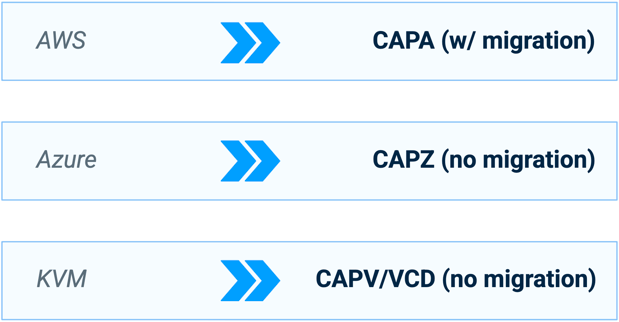
We were running clusters across three providers. AWS moved to CAPA (Cluster API Provider AWS) with a managed live migration. Azure moved to CAPZ and KVM moved to CAPV or CAPVCD, both without live migration — fewer clusters and reasonable customer onboarding and off-boarding timing made it possible to handle those through new cluster creation and manual cluster migration.
The AWS decision was different. We had a large number of production clusters, and we'd previously experienced a painful breaking change on the previous system that we didn't want to repeat. Prolonging the period where we maintained both systems in parallel would be expensive for us as a small engineering team. So for AWS, we decided we’d have to do a live migration.
Early in the journey, we organized what we called a "hive sprint" — a full month where we suspended our usual team structures and meetings, self-organized new groups, and had the entire company hack on Cluster API. We didn't complete the migration in that month, but the sprint served other purposes well: it got the whole organization to understand the future direction, revealed blockers early, and kickstarted the larger architectural discussions that would shape subsequent development.
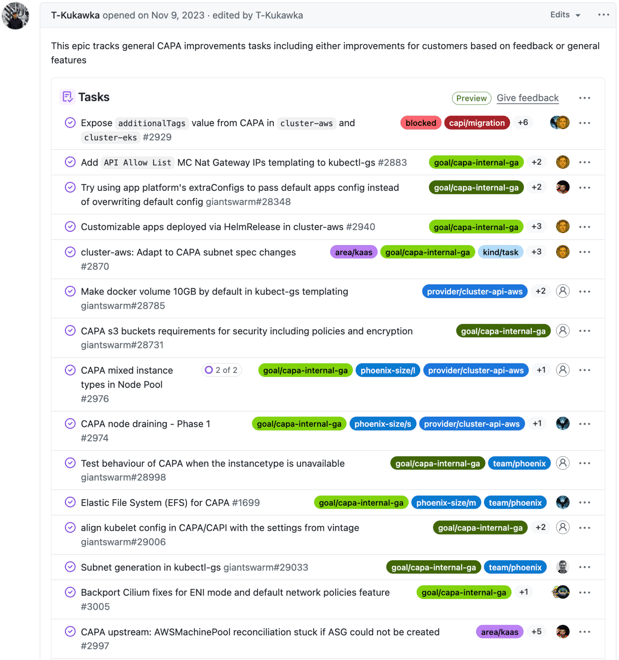
Unsurprisingly, Cluster API wasn't a drop-in replacement. Different infrastructure providers had different maturity levels, and there was substantial work required to productionize it for enterprise use. This work was made up of various issues — stability fixes, security hardening, feature gaps, enterprise requirements. None of it was a single dramatic problem. It was the hard work of a thousand small features, the kind of collaboration that characterizes how open source projects actually get built.
The migration mechanics
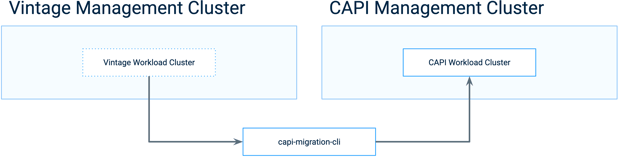
We decided early not to mix the prior system and Cluster API resources in the same management cluster, to make CRD management and operator organization easier. At a high level, the migration moved each workload cluster from its previous management cluster to a Cluster API management cluster, transforming it in the process.
We considered three approaches: a CLI tool for manual migration, an operator for automated migration, and a blue/green cluster migration that would transparently stand up a replacement cluster and move workloads across. We went with the CLI. It was practical given our cluster count, straightforward to develop, and easy to iterate on when things went wrong. The operator would have required significantly more development for full automation. The blue/green approach wasn’t considered further as some enterprise customers had severely constrained IP address space, making it impractical to double their production clusters, even temporarily.
Forking Vault for fun and certificates
In the previous system, we used HashiCorp Vault for PKI. The provider operators talked to Vault to issue certificates, distributed to workload cluster nodes via Ignition, with a separate PKI root for each cluster. For the migration to preserve cluster identity, we needed the same certificate root — specifically, the root CA signing key.
Vault won't give you the root CA signing key. There's no API route for it. Unless you fork Vault, patch in an API route that bypasses their security model, and use that to extract the certificate material, which is what we did. Before each migration batch, we replaced Vault with our patched version, pulled the certificate material, and fed it tokubeadm on the Cluster API side. These are the kinds of practical decisions that don't appear in architecture diagrams but are load-bearing in any real migration.
Custom resources and control plane transition
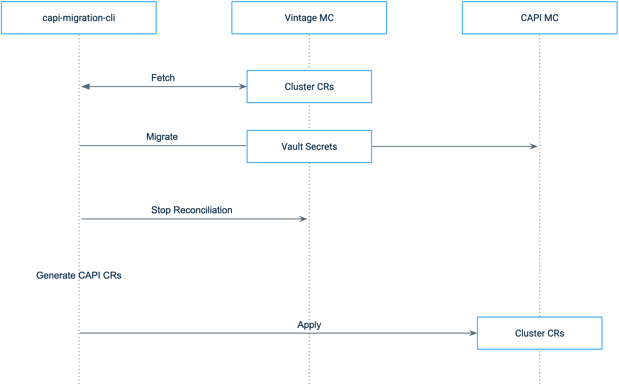
The migration process had two distinct phases. First, the CR migration: fetching all cluster custom resources from the previous system’s management cluster, migrating secrets (using the patched Vault), stopping reconciliation on the previous system’s controllers via a pause annotation, generating the equivalent Cluster API CRs, and applying them to the Cluster API management cluster.
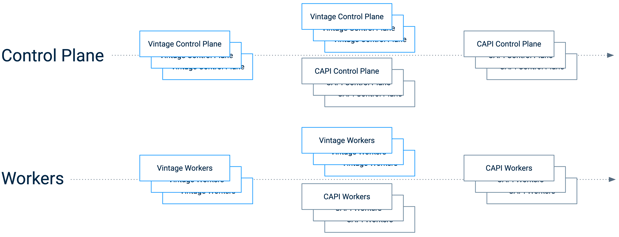
Second, the node transition. For the control plane, this was the most delicate part. We started with a HA etcd cluster running across three control plane nodes. As the first Cluster API control plane node came up, its etcd member joined the existing cluster. Cluster API's management logic then removed the previous system’s nodes that it didn't recognize. The remaining Cluster API control plane nodes joined, and we ended up with a fully Cluster API-managed etcd cluster — the same data, on new nodes.

For the Kubernetes control plane itself, our CLI tool added CAPI control plane nodes to the previous system’s ELB as they became ready, maintaining healthy targets throughout. Once the CAPI control plane was running, we stopped control plane components on the previous system’s nodes, drained them, and deleted them.
Worker nodes were the simplest part. For each node pool, once new CAPI workers were ready, we drained and deleted the old ones. The CLI had configurable batch sizes for environments with constrained IP space.
At the end of this process, the cluster was migrated, and the networking and DNS were preserved throughout. No workload interruption.
Iteration in production
The first migrations exposed issues, and nearly every new customer's clusters surfaced something novel. We hit a bug where different default node CIDRs between the previous system’s cluster and CAPI clusters caused pods to share IP addresses. One customer had manually modified route tables in the previous system, so when CAPI took over management, the routes disappeared. AWS China brought its own set of surprises.
With the CLI approach, these were fixable through iteration. We started with a friendly customer, began in lower priority environments, and worked upwards. Once the tooling was solid for a given cluster, the job became one of customer management: scheduling migration windows around enterprise change freezes, aligning stakeholders, and in one case, joining a video call for every single cluster migration (they had a lot of clusters). The customer joined the first few, and eventually trusted the process enough to only dial in for production environments.
The final cluster scheduled for migration was deleted by the customer before the migration, when they realized they weren't using it. It was somewhat anticlimactic.
What we learned
You can't stop the world
The CAPI migration wasn't the only thing happening during those years. We replaced our custom SSH solution with Teleport, migrated from the REST API to a Kubernetes-native API, built out GitOps support, and more. With an engineering mindset, you want to do one thing at a time. At any realistic company size, that's not possible. You have to lean into the parallel work rather than fight it.
Team priorities have to match stated goals
Initially, we had one team responsible for both maintenance of the previous system and Cluster API development. Maintenance tended to win the priority battle, as existing customers needed functionality and bug fixes, leading to slower development on the CAPI system than we wished for. We eventually split into two teams: one in maintenance mode on the previous system, building the capstone release to launch the migration from, and another with a clear mandate to get Cluster API migration-ready. That's when development really accelerated. The lesson: you can say what your priority is, but if your team structure doesn't reflect it, it won't happen.
Don't harvest before you plant
We tried to bring up new Cluster API providers — GCP and OpenStack — before the core migration was complete, driven by customer interest. We learned a lot about the integration work, but it distracted from the migration itself. The lesson was simple: don't try to reap the benefits of a migration before you've done the migration.
That said, we're now in a position where new providers take weeks rather than months. As VMware's appeal has shifted, we're actively investigating Proxmox, Nutanix, and Metal³ as provider options — a pace of exploration that would have been very challenging under the old system.
Upstream turned out to be a selling point
We initially worried that depending on an upstream project would slow our pace of development. The opposite happened. Upstream decisions are made with broader consensus, cover more use cases, and the resulting architecture is more flexible. Customers have already noted smoother upgrades. Upstream has also become a source of authority with our enterprise users — we can point to community direction rather than just our own roadmap.
When to replace custom-built with open source
The strategic question at the heart of this migration is one many platform teams face: when does it make sense to replace a custom-built solution with an upstream open source project?
Sometimes the answer is obvious – you pick a mature project and it fits perfectly. But with more complex requirements, the open source project will be close without matching 100%. The project will develop and mature, but it won't magically solve your requirements without your input. The question is whether your custom solution still sets you apart for customers, and whether it will continue to do so as the market evolves.
Using a Wardley mapping lens: as a component moves from custom-built toward productized, the methods for building and managing it should change. The practical point to replace a custom-built component with an open source one is when that component transitions from custom-built to product — when multiple organizations are collaborating on shared requirements, pooling learnings, and competing on differentiation higher in the stack.
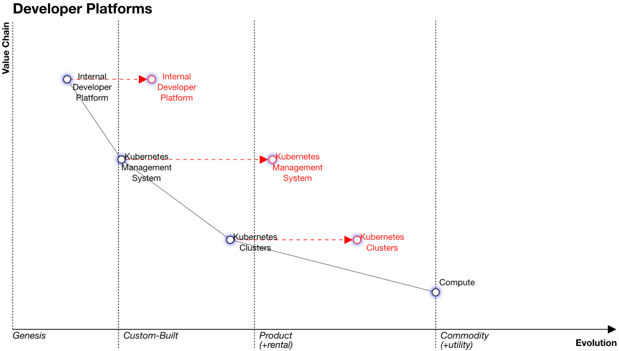
Or put more simply: your company has a limited amount of time to spend on innovation. Don't spend it on components that other people have started building together.
Since completing the migration, we've been able to invest that recovered engineering time into higher-value work — such as a hybrid edge and industrial IoT platform running CAPI-managed clusters in factories and at the edge, or building out agentic AI platforms. That's the kind of differentiation that wasn't possible when we were spending cycles maintaining our own cluster controllers.
Looking back
We started with a custom-built cluster management solution. We recognized that the open source community was solving the same problem. We made the difficult decision to rebase on top of that community work, executed a technically complex live migration, and came out the other side with a more capable, more flexible platform.
The migration required deep technical work, leadership buy-in, customer management, and involvement from across the entire organization. There's no shortcut for that. But if you're maintaining a custom-built solution in a space where open source is maturing — and especially if that solution is no longer what differentiates you to customers — it's worth seriously considering the move.
If you're on a platform team and want to do less of this, we'd be happy to talk about it.
From three clusters to eighty: how scale shapes platform engineering
"Platform engineering" is one of the more elastic terms in the industry. A team running three clusters and a team running eighty both use it to descri …
It's Cluster API time — are you ready?
As some of you might have seen, we’ve been working on and talking about Cluster API a lot lately. I felt like now’s a good time to review what Cluster …

Self Driving Clusters - Managed Autoscaling Kubernetes on AWS
One of Giant Swarm's advantages is the opportunity to modernize and scale cloud platforms. We provide managed Kubernetes clusters for our customers, w …